Walgreens Workforce Scheduler Login – Employee Schedule Portal
Welcome to
Walgreens Workforce Scheduler Login Guide
If you are a Walgreens employee trying to check your work schedule, you are in the right place. Walgreens uses the Workforce Scheduler powered by Reflexis to manage employee schedules, shift changes, and availability.
Most employees access it to quickly answer one question:
“When am I working next?”
Use the official login portal below to view your Walgreens employee schedule.
Note: Bookmark this page so you don’t lose access
Access Walgreens Workforce Scheduler Login (Official Portal)
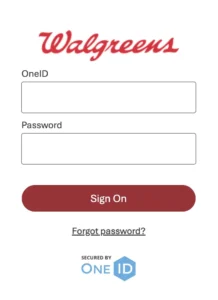
You will need your Walgreens OneID and password to sign in.
Download the Walgreens ESS Schedule App (iOS and Android)
If you prefer checking your schedule from your phone, Walgreens employees can use the Reflexis ESS Employee Self-Service app. This is the official mobile app used for viewing schedules and managing shift related tasks.
The app gives you quick access to:
- Your Walgreens employee schedule
- Upcoming shifts and changes
- Time off requests
- Shift swaps when enabled by your store
- Schedule notifications
What is the Walgreens Workforce Scheduler?
The Walgreens Workforce Scheduler is the scheduling system Walgreens uses across stores to manage employee shifts. Internally, it runs on Reflexis Workforce Scheduler, which is also known to employees as:
- Walgreens Schedule Portal
- Walgreens ESS Schedule
- Reflexis One
- Walgreens Employee Schedule
No matter what name employees use, it all points to the same system. This is where Walgreens team members view weekly schedules, see upcoming shifts, request time off, and manage availability.
The system works both through a web browser and through the Reflexis ESS mobile app, depending on how you choose to access it.
How Walgreens Employees Access Their Schedule
Most current employees use one of three methods to access their schedule.
1. Reflexis Web Portal (Most Reliable)
This is the same link many long term employees bookmark and use from home.
https://rwswalgreens.reflexisinc.com/RWS4/
You can log in using:
- Your Walgreens OneID
- Your current password
This method works best on a desktop or laptop and is often more stable than the app.
2. Reflexis ESS Mobile App
Walgreens also allows employees to view schedules using the ESS Employee Self-Service app, sometimes listed as Reflexis One.
With the app, employees can:
- View weekly schedules
- Request time off
- Swap shifts when enabled
- Receive schedule change notifications
- Clock in and out using geofencing in some locations
Employees commonly report that the app works, but can be buggy after updates. Many employees keep both the app and the web portal as backup.
3. Store Computer or StoreNet Access
Some Walgreens locations restrict access to scheduling tools outside the store network. If you cannot log in from home, your store may require you to access Workforce Scheduler from:
- The office computer
- StoreNet
- A secure in store network
This is normal and varies by store and role.
Walgreens Workforce Scheduler Login Issues Employees Face
One reason Reddit threads and Facebook posts rank so well is because many employees struggle with access. These are real issues Walgreens employees experience, not edge cases.
Page Does Not Exist Error
This usually happens when:
- The system is under maintenance
- Too many login attempts occur at once
- You are using an outdated bookmark
Solution:
- Refresh and try again after a few minutes
- Use the official Reflexis link above
- Try a different browser
App Crashing or Not Loading
Many employees report the Reflexis app crashing after updates.
What usually works:
- Uninstall the app
- Reinstall the latest version
- Log in manually instead of using Face ID or Touch ID
- Scan the QR code provided through internal Walgreens communications if prompted
Password or OneID Problems
If the scheduler asks you to reset your password, it usually means:
- Your OneID password expired
- Walgreens forced a security update
- Reset your password through official Walgreens systems or ask a store manager for help.
If you are unsure how OneID works, check our Walgreens OneID login guide.
Can Only Access From the Store
Some employees find they can only access schedules from the office computer. This is often due to:
- Store specific security settings
- Role based access
- Network restrictions
In these cases, the system is working as designed, not broken.
Walgreens ESS Schedule and the Reflexis App Explained
The Walgreens ESS Schedule refers to Employee Self-Service access inside the Reflexis system.
Using ESS, employees can:
- Check schedules without asking a manager
- Submit availability changes
- Request time off
- Pick up open shifts if enabled by the store
Not all stores allow every ESS feature. Store managers control what functions are available.
If the app is not working properly, employees often rely on the printed schedule posted in the break room as a backup.
How to Check Your Walgreens Schedule From Home
Many employees prefer checking schedules on off days. In most cases, you can do this from home using the Reflexis portal.
Things to keep in mind:
- Use a secure internet connection
- Avoid public WiFi
- Do not save passwords on shared devices
If the system blocks access, it is usually a store policy issue, not a personal account issue.
Access For Former Employees
If you are a former employee:
- Workforce Scheduler access usually ends after termination
- Schedule history may not be available
- Pay and tax documents follow different systems
Former employees looking for tax forms can use this guide about W-2 form access for Walgreens Employees.
Related Walgreens Employee Resources
If you work at Walgreens, these related resources may also help you:
- Walgreens Paystub Access
- Walgreens Employee Benefits
- Walgreens Holiday Schedule
- Walgreens Employee Discounts
- Walgreens Fiscal Year Calendar
- Walgreens Employee Leaves and holiday policy
Each of these pages supports the same employee ecosystem and strengthens schedule related searches.
Why So Many Employees Bookmark the Scheduler
A common pattern across Reddit and employee forums is bookmarking the Reflexis login page.
Employees do this because:
- The link works consistently
- It avoids navigating internal portals
- It saves time during busy weeks
- If you check your schedule often, bookmarking the login portal is practical.
Final Notes for Walgreens Employees
If Workforce Scheduler is not loading, do not panic. Most access issues resolve within minutes or after a reinstall.
If problems continue:
- Ask a store manager
- Try accessing from the office computer
- Contact Walgreens internal IT support if directed
Disclaimer:
krogerfan.com is not affiliated with Walgreens Boots Alliance or Walgreens. This page is provided for informational purposes to help employees access official Walgreens systems. Always use your official credentials on secure devices.
FAQs About Walgreens ESS Workforce Scheduler
What is the Walgreens ESS Workforce Scheduler?
The Walgreens ESS Workforce Scheduler is the employee scheduling system used by Walgreens to manage work shifts, availability, and time off. It runs on the Reflexis platform and allows employees to view their schedules online or through the ESS mobile app.
How do I log in to the Walgreens Workforce Scheduler?
You can log in to the Walgreens Workforce Scheduler using your Walgreens OneID and password through the official Reflexis portal. Most employees access it using a web browser or the Reflexis ESS mobile app.
What login credentials are required for Walgreens ESS?
Walgreens ESS requires your active OneID username and password. These credentials are issued by Walgreens when you are hired and are the same ones used for other internal employee systems.
Can Walgreens employees check their schedule from home?
Many Walgreens employees can check their schedules from home using the Reflexis Workforce Scheduler. Some stores restrict access to in store networks only, which means certain employees may need to use a store computer.
Why does the Walgreens Workforce Scheduler say page does not exist?
This error usually appears during system maintenance, temporary outages, or when an outdated link is used. Refreshing the page, waiting a few minutes, or using the official Reflexis login URL often resolves the issue.
What is the Reflexis ESS app used for at Walgreens?
The Reflexis ESS app allows Walgreens employees to view schedules, request time off, swap shifts when available, and receive notifications about schedule changes. Some locations also allow clock in and clock out features.
Why is the Walgreens ESS app not working or crashing?
The ESS app may stop working after updates or due to login settings like Face ID. Reinstalling the app, logging in manually, or switching to the web version often fixes the problem.
Can former Walgreens employees access Workforce Scheduler?
Former Walgreens employees usually lose access to Workforce Scheduler after termination. Schedule history may no longer be available once employment ends.
Who should I contact if I cannot log in to Walgreens ESS?
If you cannot log in to Walgreens ESS, contact your store manager first. They can guide you on password resets or direct you to Walgreens internal IT support if needed.